Hello,
I have a Tank 3 Pro (EEA European version; 18 GB RAM). I am having trouble with app compatibility in Android 14 and I want to flash again Android 13.
I was exploring the options to flash again for downgrading, here is what I tried (help me with any you see better):
-
I looked at “Settings” > “System update” > “Local updates” but I don’t find download link for full OTA zip file. If you can send me the file I would try this.
-
I tried to reboot to recovery and “Update via ADB”, but again I have no full ADB update files. Again, if you give me the files for this method I will try this.
-
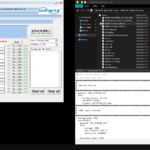
I downloaded the firmware file and flash tool from 8849tech (https://drive.google.com/drive/folders/0By1nhWOmuw2KdDhTUlFOZHpXQjg?resourcekey=0-KHJPIYVPw2iHL–cceWyaw) but when I try to load the MT6895_Android_scatter.txt I face this error (see image below). I tried downloading different versions of from google drive, all gave the same error so seems like a error from flash tool. If you provide me with an updated / fixed version of flash tool and I will try again. I prefer Linux version (I use Linux Mint and Fedora), but I can also use Windows if required.

-
I have unlocked the bootloader, and I can try to flash the *.img files from the previous link with fastboot, but I would prefer other options. If we can’t do other options, please tell me which commands I should use (like “fastboot flash XXX_a XXX.img”, “fastboot -w update YYY.zip”, etc.). I’m used to command line tools but I want to make sure I’m not overlooking any option with fastboot.
Thank you for your help.


2 Responses
Here is the full-size image for the error:
https://drive.google.com/file/d/1r_eAfa-WMd8snIUF-nFbzgMD4WusN7CO/view?usp=drive_link
I got an answer from support mail, the tool for flashing Tank 3 Pro needs to be V6. Here is the link for anyone looking for help: https://drive.google.com/drive/folders/1VELI-XS987mM43PCmHrvnELavw9_kEJK